
How to Build a WhatsApp API Microservice for High-Volume Marketing Campaigns
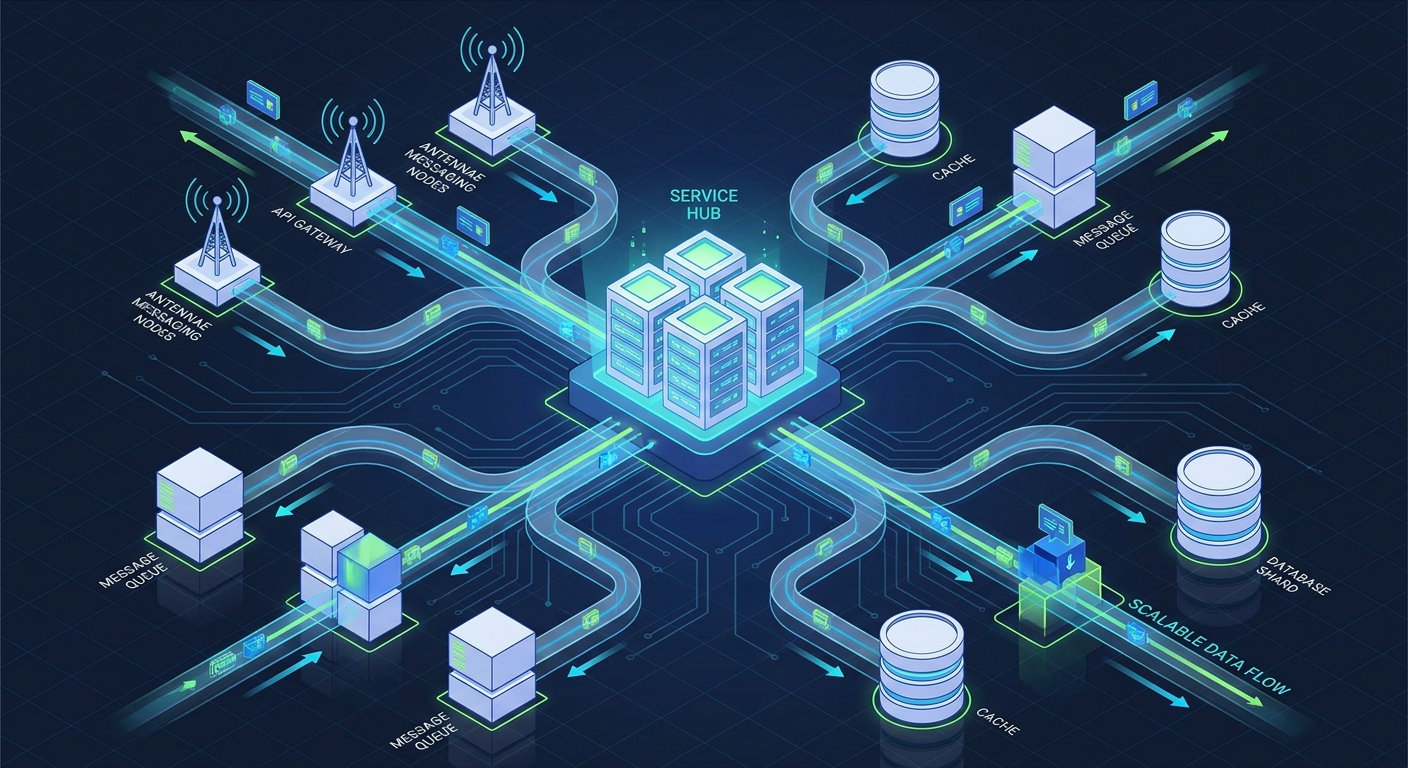
When a growing SaaS company or digital agency scales its customer retention strategy, the underlying communication infrastructure is immediately put to the test. Sending a few dozen automated messages is trivial; dispatching tens of thousands of personalized marketing campaigns, onboarding sequences, and support alerts requires a fundamentally different approach. Integrating messaging logic directly into your core application monolith often leads to blocking threads, dropped webhook events, and degraded application performance. To achieve true operational trust and reliability, technical founders and lead software engineers must adopt a WhatsApp API microservice architecture.
Why Monoliths Fail at High-Volume WhatsApp Engagement
In the early stages of product development, it is tempting to trigger WhatsApp REST API calls directly from your main application server. A user signs up, your core application handles the database insertion, and then it synchronously fires an API request to send a welcome message. While simple, this tight coupling creates severe bottlenecks as your user base grows.
- Synchronous Blocking: If the external API experiences latency or network jitter, your main application thread is blocked waiting for a response, degrading the experience for the end user.
- Rate Limiting Collisions: High-volume marketing campaigns can easily trigger provider rate limits. Without a decoupled system to pace outbound requests, your core app will encounter HTTP 429 (Too Many Requests) errors, leading to lost messages.
- Webhook Overload: WhatsApp APIs rely heavily on asynchronous webhooks to deliver message statuses (sent, delivered, read) and inbound replies. A successful broadcast to 10,000 users will instantly generate 30,000+ webhook events. Routing this traffic to your primary web server can cause CPU spikes and dropped connections.
- Multi-Session Complexity: For growth-focused agencies managing multiple client accounts, handling multi-session authentication and state within a monolithic codebase becomes a maintenance nightmare.
By extracting WhatsApp communication into a dedicated microservice, you isolate these risks. Your core application simply emits an event (e.g., "user_onboarded"), and the microservice asynchronously handles the formatting, queueing, delivery, and state management.
The Core Components of a WhatsApp API Microservice Architecture
A robust, scalable messaging microservice acts as a middleware layer between your core SaaS application and your WhatsApp API provider. To build a system capable of handling high-volume customer retention campaigns, your architecture should include the following five components.
1. The Event Ingestion and Queueing Layer
The foundation of a reliable microservice is an asynchronous message broker, such as RabbitMQ, Apache Kafka, or Amazon SQS. When your main application needs to send a message, it publishes a payload to this queue rather than making an HTTP request to the API directly. This decoupling provides immediate fault tolerance. If the WhatsApp network is temporarily unreachable, the messages remain safely in the queue. Furthermore, queues allow you to implement strict rate-limiting consumers. You can configure your worker nodes to process exactly X messages per second, ensuring you stay well within the safe operational limits of your chosen REST API provider.
2. The Multi-Tenant Session Manager
For SaaS platforms and agencies operating white-label solutions, multi-session management is critical. Your microservice must dynamically route outbound messages through the correct client session. This requires a dedicated session database (often Redis for high-speed access or PostgreSQL for persistence) that maps a `tenant_id` to a specific WhatsApp channel ID or authentication token. When the worker pulls a message from the queue, it queries the session manager to inject the correct credentials into the API header before dispatching the request to the WasenderApi endpoint.
3. The Idempotency and Retry Engine
Network partitions happen. A worker might successfully send a message but crash before acknowledging the queue, leading to a duplicate delivery attempt. To maintain trust with your end-users, your microservice must implement idempotency keys. By generating a unique hash for every outbound message and storing it in a fast key-value store, your microservice can check if a message has already been processed before dispatching it. Coupled with an exponential backoff retry strategy, this ensures that transient network errors are handled gracefully without spamming your customers.
4. The Webhook Receiver and Event Router
Inbound traffic is just as important as outbound traffic. Your microservice should feature an optimized, lightweight endpoint dedicated solely to receiving webhooks from your WhatsApp API provider. This receiver should do zero processing; its only job is to return an immediate HTTP 200 OK to prevent provider timeouts, and then push the incoming payload onto an inbound message queue. A separate pool of worker nodes can then parse these webhooks, update message delivery statuses in your database, and forward actionable replies back to your core application's webhook URL.
5. Observability and Dead Letter Queues (DLQ)
Operational discipline requires deep visibility into your communication infrastructure. Your microservice must log every state transition. If a message fails all retry attempts (e.g., due to an invalid phone number format), it should be routed to a Dead Letter Queue. Lead engineers can then set up automated alerts on the DLQ to monitor for systemic issues. Tracking metrics like queue depth, webhook processing latency, and delivery success rates is essential for maintaining a healthy customer retention engine.
Implementing the Architecture with WasenderApi
When architecting this microservice, the reliability of your underlying WhatsApp API provider is the final variable. WasenderApi is designed specifically for developers and technical founders who require a predictable, scalable REST API without the overhead of maintaining headless browser instances themselves.
By pointing your microservice's worker nodes at WasenderApi, you offload the complexities of protocol-level encryption and session persistence. Your microservice simply constructs a standard JSON payload containing the recipient's number and the message template, attaches your instance token, and makes a POST request. For detailed implementation guidance on payload structuring, authentication, and webhook verification, refer to the official API documentation.
Because WasenderApi handles the heavy lifting of the WhatsApp connection, your microservice can focus entirely on business logic: pacing drip campaigns, routing multi-agent support tickets, and aggregating analytics for your agency clients.
Designing for High-Volume Customer Retention
Customer retention strategies rely on timely, relevant communication. Whether you are sending automated abandoned cart recovery messages, SaaS usage alerts, or subscription renewal reminders, the timing and deliverability of these messages directly impact your bottom line. A microservice architecture empowers growth-marketing teams by providing a reliable infrastructure that won't buckle under the weight of a massive broadcast.
Consider a scenario where your marketing team schedules a promotional broadcast to 50,000 inactive users. In a monolithic system, this could bring your web servers to a halt. With a decoupled microservice, the core app instantly pushes 50,000 jobs to the queue. The marketing team sees the campaign marked as "Processing." In the background, your microservice's worker nodes steadily consume the queue, pacing the API requests to WasenderApi at a safe, sustained rate, while the webhook receiver seamlessly processes the incoming flood of "delivered" and "read" receipts, updating the campaign dashboard in real-time.
Conclusion
Transitioning to a WhatsApp API microservice architecture is a strategic investment in the reliability and scalability of your customer communication infrastructure. By decoupling message queueing, webhook processing, and multi-session management from your core application, you eliminate performance bottlenecks and protect your main systems from external API volatility. For technical founders and engineering leads, this architectural pattern provides the operational trust necessary to scale high-volume marketing campaigns and agency workflows confidently.
Frequently Asked Questions
What is a WhatsApp API microservice architecture?
A WhatsApp API microservice architecture is a software design pattern where all WhatsApp messaging logic—including outbound queueing, rate limiting, session management, and inbound webhook processing—is extracted from the main application into a standalone, independent service. This prevents messaging operations from blocking core application resources.
Why should I use a message queue for high-volume WhatsApp campaigns?
Using a message broker like RabbitMQ or AWS SQS allows you to decouple message generation from message delivery. This provides fault tolerance during network outages, allows for precise rate limiting to avoid provider bans, and ensures that large marketing broadcasts do not overwhelm your primary servers.
How do you handle multi-tenant session management in a microservice?
Multi-tenant management is achieved by maintaining a central database (like Redis) that maps a specific client or tenant ID to their unique WhatsApp session credentials. When the microservice processes an outbound message, it queries this database to authenticate the API request dynamically for the correct client.
How does WasenderApi support microservice implementations?
WasenderApi provides a reliable, stateless REST API interface that integrates seamlessly with microservice worker nodes. It abstracts the complexities of the WhatsApp protocol, allowing your microservice to focus purely on queue consumption, idempotency, and routing, while relying on WasenderApi for the final delivery execution.
Related Posts

WhatsApp API Rate Limits Explained: How to Scale Messaging Safely in 2025
Struggling with WhatsApp messaging restrictions? Learn how Meta's tier system works, how to upgrade your daily limits, and how to scale your broadcasts safely without getting banned.

Wasender API: The Easiest Way to Automate WhatsApp Messaging for Your Business
Wasender API is a simple, low-cost solution for automating WhatsApp messages without approval delays or high fees. Perfect for businesses and developers who want to send bulk messages, automate chats, and scale communication using a reliable and flexible WhatsApp API.

How to Bypass the WhatsApp Business API 24-Hour Window in 2025
Frustrated by Meta's messaging restrictions? Learn how the WhatsApp Business API 24-hour window works, why it destroys customer retention, and how to safely bypass it using unofficial APIs.